
Design workflows
Messaging steps
Send and receive messages from AsyncAPI contracts in a workflow, match them with a correlationId, and know why they are always simulated.
Some APIs do not answer a call right away. They publish an event later: a payment confirmation, a webhook, a message on a queue. A messaging step lets a workflow send a message or wait for one, using an AsyncAPI contract. Use it when a chain mixes API calls with events.
Send and receive
Section titled “Send and receive”| Action | What the step does |
|---|---|
send |
Publishes a message to a channel. The step always works: it takes the payload you give it. |
receive |
Waits for a message on a channel. In a run, Luvin builds an example message that satisfies the step’s success criteria. |
A channel is the address messages travel on, for example pokedex.sighting.confirmed. The AsyncAPI contract lists the channels and what each message looks like.
Add a messaging step
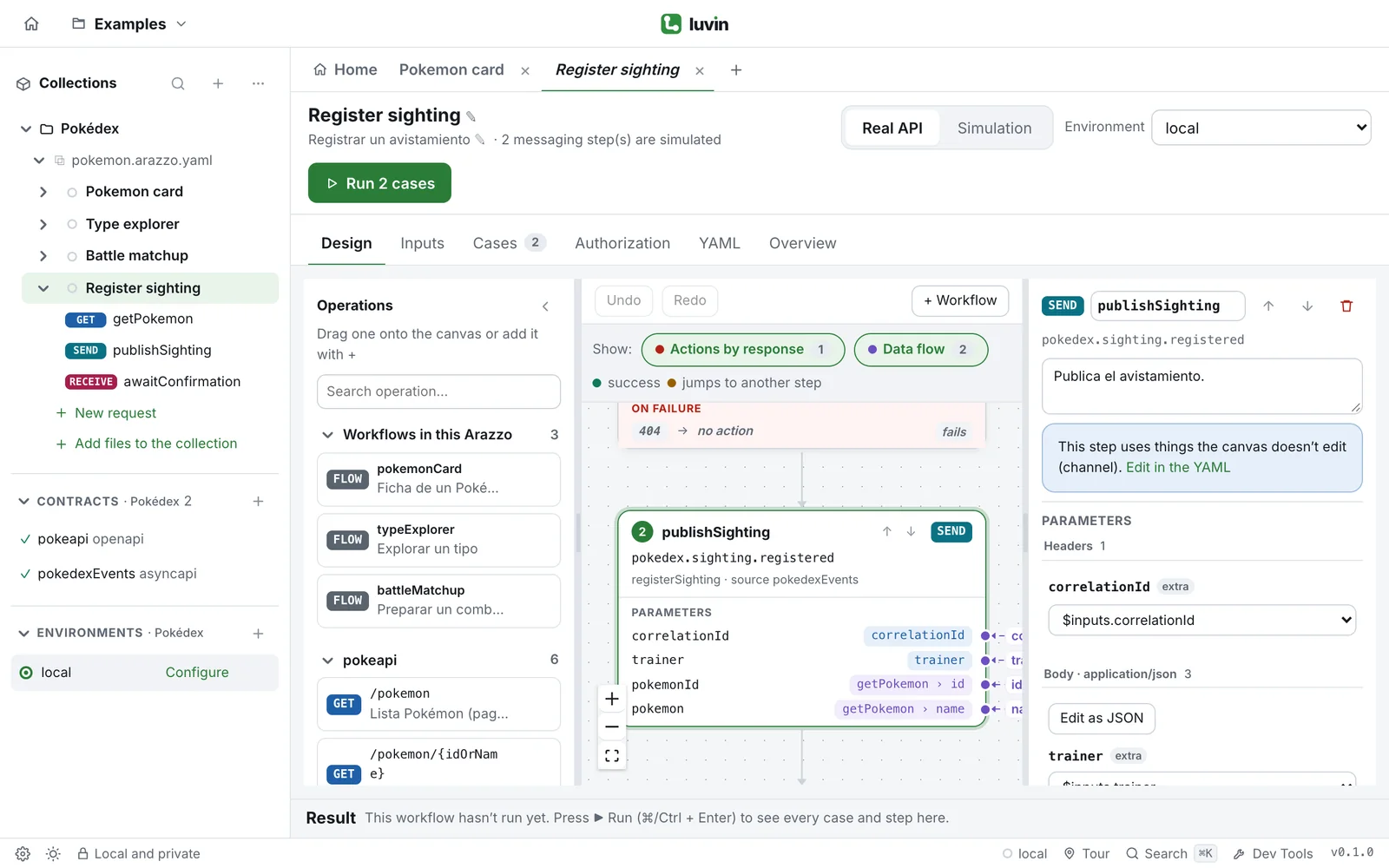
Section titled “Add a messaging step”Operations of AsyncAPI contracts are not in the Operations palette, so you add these steps in the YAML tab. Once written, the step appears on the canvas like any other, with a SEND or RECEIVE tag and the address of the channel. When you open it, the panel says This step uses things the canvas doesn’t edit, names them (for example channel) and offers Edit in the YAML. Its outputs, success criteria and error actions are still edited in the panel.
In the YAML tab, the editor helps you write them: after channelPath: and operationId: it offers the channels and operations of the loaded contracts, and after action: it offers send and receive.
Example: Register sighting
Section titled “Example: Register sighting”Register sighting, in the Pokédex example, mixes an HTTP call with two messaging steps. It looks up a Pokémon, publishes a sighting and waits for the Pokédex to confirm it.
- stepId: publishSighting operationId: $sourceDescriptions.pokedexEvents.registerSighting action: send parameters: - name: correlationId in: header value: $inputs.correlationId requestBody: payload: trainer: $inputs.trainer pokemonId: $steps.getPokemon.outputs.id pokemon: $steps.getPokemon.outputs.name- stepId: awaitConfirmation channelPath: '{$sourceDescriptions.pokedexEvents.url}#/channels/sightingConfirmed' action: receive correlationId: $inputs.correlationId timeout: 5000 dependsOn: [publishSighting] successCriteria: - condition: $message.payload#/status == 'CONFIRMED' onFailure: - name: sightingRejected type: end criteria: - condition: $message.payload#/status == 'REJECTED' outputs: entryNumber: $message.payload#/entryNumberThe fields of a messaging step
Section titled “The fields of a messaging step”| Field | Applies to | What it does |
|---|---|---|
action |
Both | send or receive. If you leave it out, Luvin uses the action of the AsyncAPI operation. Set it when a channel has both. |
parameters with in: header |
Both | Become headers of the message. Parameters in other places are ignored, and Luvin warns you. |
requestBody |
send |
The payload to publish. On a receive it is ignored. |
correlationId |
receive |
The value the awaited message must carry. See below. |
timeout |
receive |
How many milliseconds to wait. 5000 is five seconds. |
successCriteria |
Both | Conditions on the message, such as $message.payload#/status == 'CONFIRMED'. |
outputs |
Both | Values taken from the message, such as $message.payload#/entryNumber. |
The prefix $message.payload reads the body of the message and $message.header reads its headers.
Match the right message with correlationId
Section titled “Match the right message with correlationId”Many messages arrive on the same channel, for many orders or users. The correlationId tells the step which one is yours. In Register sighting, the input correlationId is a generated unique id. The send step puts it in a header, and the receive step waits for a message with that same id. Using one input for both keeps them equal.
In the PayPal example, Capture order waits for the webhook of one order:
- stepId: awaitCaptureEvent channelPath: '{$sourceDescriptions.paypalEvents.url}#/channels/captureCompleted' action: receive correlationId: $inputs.orderId timeout: 5000 successCriteria: - condition: $message.payload#/resource/status == 'COMPLETED' outputs: eventId: $message.payload#/id capturedAmount: $message.payload#/resource/amount/valueThe AsyncAPI contract says where the id sits in the message. Luvin writes the id there in the message it builds. correlationId on a send is ignored.
What happens at run time
Section titled “What happens at run time”- A
sendends as sent, and the results label it Sent. - A
receiveends with Message received, and its outputs are available to the next steps. - If you set
timeoutand the case simulates that no message arrives, the step fails with No message arrived on “channel” within 5000 ms (timeout). - Without
timeout, Luvin adds a note: with a real broker, the step would wait forever.
When you run against the Real API, the run bar tells you how many steps are simulated, for example 2 messaging step(s) are simulated, and each messaging step ends with a warning: Simulated: Luvin does not connect to brokers yet, so this step uses the AsyncAPI examples. In Simulation it ends as a success.
Cases for messages
Section titled “Cases for messages”Luvin can generate cases from the actions of a receive step. A case simulates a message with the values an action expects, for example “awaitConfirmation: a message arrives REJECTED → sightingRejected”. A step that has an action with no criteria also gets a case where no message arrives. See Cases.