
Get started
What is Luvin
The problem Luvin solves, how it works in four steps, who it is for and what it is not.
Luvin tests chains of API calls and shows how data moves from one call to the next. Read this page to decide whether it fits your work, then follow the quick start.
The problem
Section titled “The problem”A single screen of an app usually depends on several APIs called in order. Take a shop:
- You log in on API A and get a token.
- You call API B with that token and get the customer.
- You call API C with the customer’s id and get their orders.
To test C, you first call A and B by hand and copy values from one response into the next request. Every time. And nobody can quickly say which APIs that screen depends on, or how the data moves between them.
Luvin removes those manual calls. You describe the chain once, as a workflow: a sequence of API calls where each step can use data from the previous ones. Luvin then runs the whole chain for you and tells you, in plain words, whether it worked.
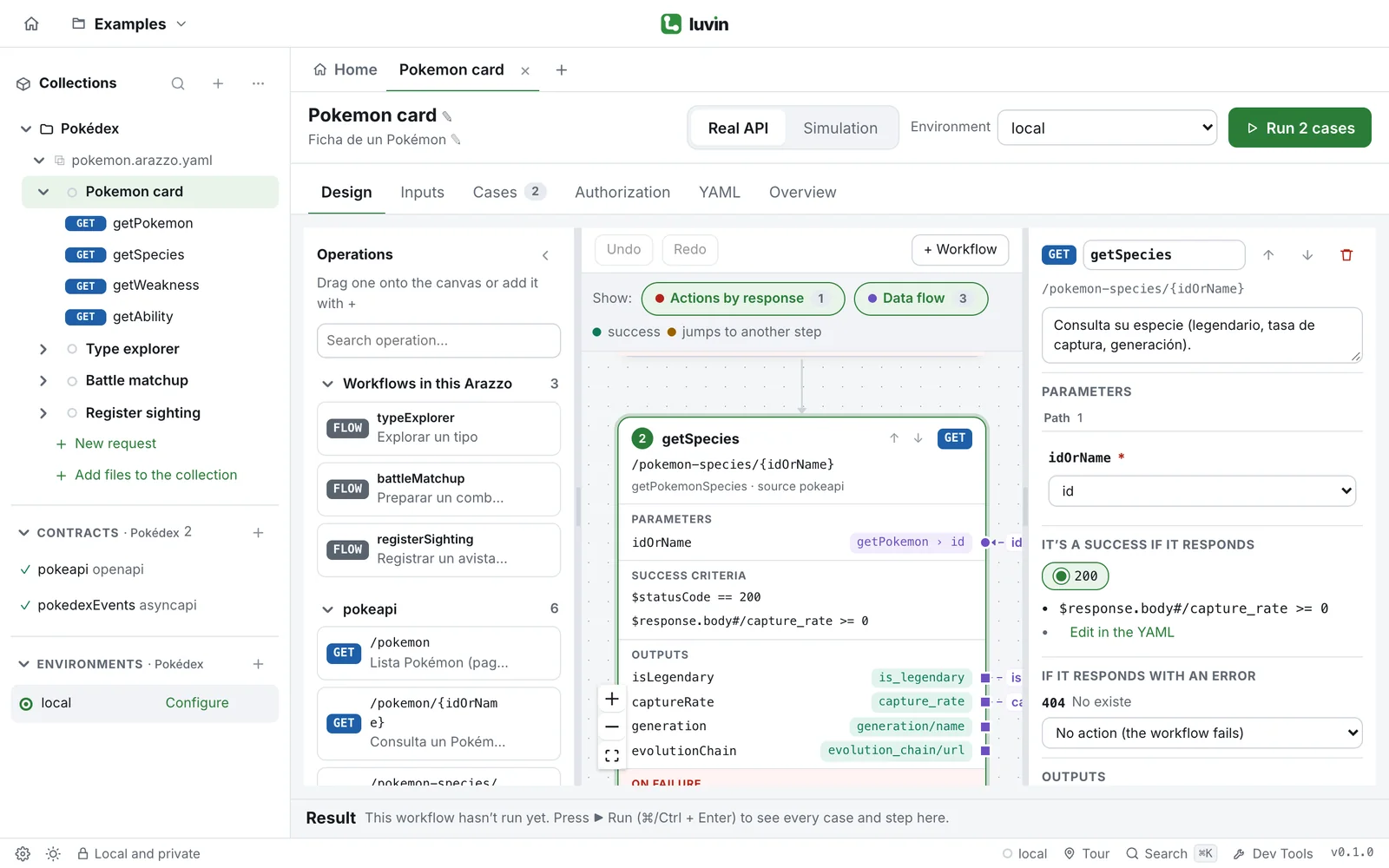
Example: the Pokémon card
Section titled “Example: the Pokémon card”The bundled Pokédex workflow chains four calls to the public PokéAPI. Each arrow is data that Luvin wires for you:
getPokemon ── id ─────────────▶ getSpecies ── mainType ───────▶ getWeakness ── firstAbility ───▶ getAbilityYou enter one value, pokemon: pikachu. Luvin runs the four steps, passes each result to the next and tells you whether the chain worked. Try it in the quick start.
How it works
Section titled “How it works”- Bring your contracts. A contract is the OpenAPI or AsyncAPI file that describes an API. Add the contracts of the APIs involved.
- Draw the workflow. Drag the operations of those contracts onto a canvas. Luvin connects the data between steps by rules, with no AI involved. For example, a
customerIdparameter is connected to theidthat the “create customer” step returned. - Get the Arazzo. The canvas writes a standard Arazzo file, the OpenAPI Initiative’s open format for sequences of API calls. The file is yours and stays readable as YAML.
- Test the chain. Luvin generates cases (a case is one run of the workflow with given inputs) and you add your own. Run them against the real API, or in simulation, where Luvin answers from the examples in the contract without calling anything.
Who it is for
Section titled “Who it is for”| You are | Luvin helps you |
|---|---|
| An integration or QA engineer | Stop calling each API by hand. You get generated negative cases, a clear verdict per case and every request in Dev Tools. |
| On an API product or partner team | Show that a workflow made of several APIs works end to end, with a report to share. |
| A product manager or in a business role | Try a workflow with your own data in a simple interface, with no command line and no test code. |
| An API designer | See how your APIs connect and check workflows against the real contracts. |
What Luvin is not
Section titled “What Luvin is not”- Not an automation or orchestration tool. Luvin is for designing, debugging and demonstrating API workflows. It does not run integrations in production.
- Not a CI runner. The Arazzo files it writes are what you take to your pipeline.
- Not a replacement for your API client. Luvin can send single requests, and it does so to help you debug one step. Keep your API client for single requests and use Luvin for the chain.
- Not a hosted service. Everything runs on your computer, in the browser or in the desktop app. There is no backend and no account.