
Workspaces
Collection authorization
Set one authorization for a collection, see which requests use it, and learn where it is saved.
The collection authorization is the credentials that the requests of a collection use by default. You set it once, and every request set to Inherit from collection sends it. Use it when most requests of a collection call the same API with the same token or key.
Set it
Section titled “Set it”Example: all the requests of a shop collection use one bearer token, stored in the variable apiToken of the environment.
- Open the collection overview: click the collection name in the sidebar.
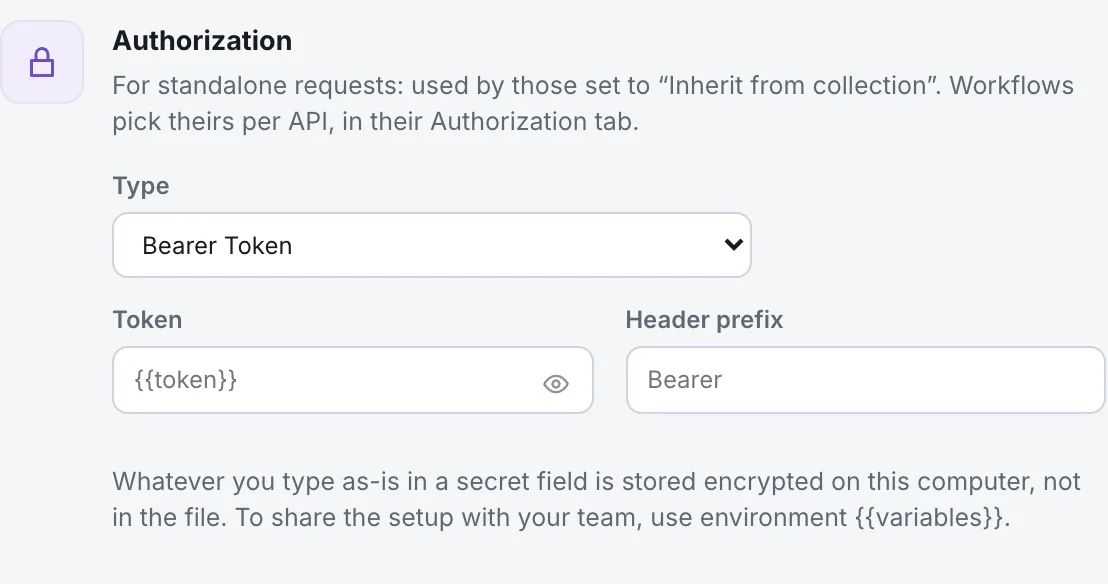
- Find the card Authorization. Its hint says: For standalone requests: used by those set to “Inherit from collection”.
- In Type, choose Bearer Token.
- In Token, type
{{apiToken}}. - Leave the prefix as
Bearerunless the API uses another.
Nothing to save: Luvin saves it by itself. The other types you can choose are Basic Auth, API Key, Digest Auth, NTLM Auth, OAuth 1.0, OAuth 2.0, WSSE Auth, AWS Sig v4, Akamai EdgeGrid and No Auth. Each one has its own fields: see Collection authorization.
Without an authorization, the card says Requests that inherit from the collection are sent without authorization.
Which requests use it
Section titled “Which requests use it”| Where | Uses the collection authorization? |
|---|---|
| A request whose Authorization type is Inherit from collection | Yes. The request says Uses the collection’s authorization: Bearer Token. |
| A request with its own type | No. It uses its own. |
| Requests created by Generate requests from a contract | Yes. They start inheriting it. |
| Requests imported from Postman or Bruno | If the source collection had an authorization, it arrives here. |
| A workflow | Not by default. See below. |
If the collection has none, a request set to inherit says The collection has no authorization set up, so this request goes without one.
What workflows use
Section titled “What workflows use”A workflow picks its authorization per API in its own Authorization tab, and a workflow does not use the collection authorization on its own. The tab offers Inherited from the collection if you want a workflow to use this one. See Authorization of a workflow.
Where it is saved
Section titled “Where it is saved”version: 1name: Shopauth: type: bearer token: '{{apiToken}}'A value with {{variables}} is written to the file as is. A value you type directly, such as a real token or a password, is not written to the file: it is kept encrypted on this computer. That is why a teammate who clones the collection must type their own. See Secrets.