
Authorization
Authorization of a workflow
Choose, per API and per workflow, how each call is authorized, sign in before a run and find the flow-auth.yaml file.
The Authorization tab of a workflow decides how each API the workflow calls is authorized: with the credentials of the contract, with OAuth 2.0, with an API key and so on. Use it when pasting a token in the environment is not enough, for example when the token expires and must be requested again.
Arazzo has no concept of authorization. This is a Luvin setting and the Arazzo file is not modified.
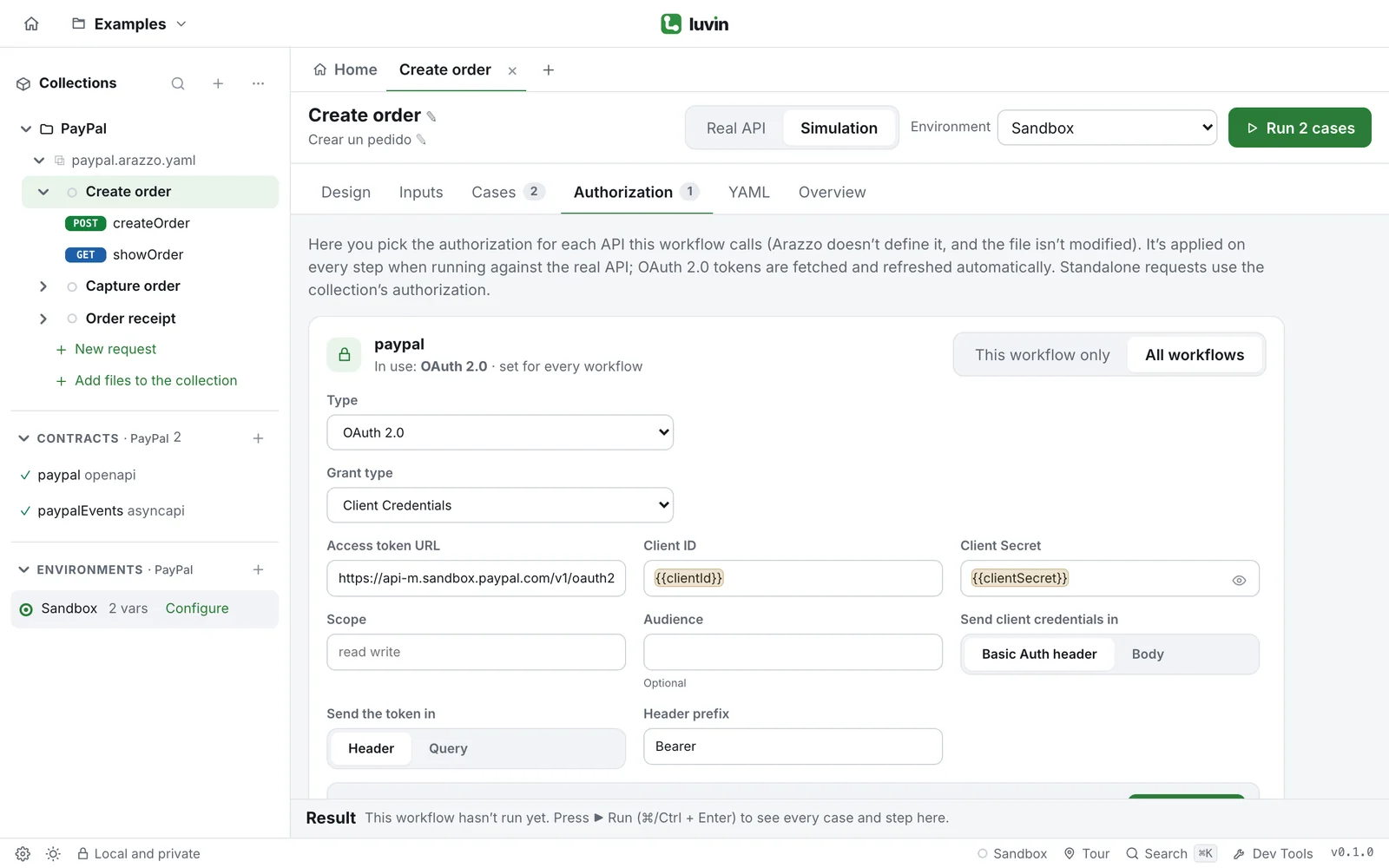
Example: the PayPal setup, as saved
Section titled “Example: the PayPal setup, as saved”The setting is saved in flow-auth.yaml, in the folder of the collection. This is the file of the PayPal example:
apis: paypal: type: oauth2 grantType: client_credentials accessTokenUrl: https://api-m.sandbox.paypal.com/v1/oauth2/token clientId: '{{clientId}}' clientSecret: '{{clientSecret}}' credentialsIn: header tokenIn: header headerPrefix: BearerA setting for one workflow goes under a second key, journeys, by Arazzo file and workflow id (file.arazzo.yaml#workflowId). If you rename the Arazzo file in Luvin, they follow it. The file is written only when you configure something.
Open the tab
Section titled “Open the tab”- Open a workflow from the sidebar.
- Click the Authorization tab, next to Cases.
You see one card per HTTP API the workflow calls. A workflow with none shows This workflow doesn’t call HTTP APIs. Each card shows what is used now and where it was set, for example In use: OAuth 2.0 · set for every workflow. The other origins are set in this workflow, inherited from the collection and environment credentials.
Two levels: all workflows or this one
Section titled “Two levels: all workflows or this one”Each card has a switch.
| Position | What it sets |
|---|---|
| All workflows | The authorization of this API for every workflow of the collection that calls it, except those that set their own. |
| This workflow only | The authorization of this API for the open workflow. |
The most specific wins: This workflow only, then All workflows, then the credentials of the contract. The card opens on the level that decides today.
The types
Section titled “The types”Under All workflows, in Type:
| Option | What happens |
|---|---|
| From the contract | The default. Uses the securitySchemes of the contract with the values in Credentials of the active environment. Open the environment goes there. See Credentials of the contract. |
| Inherit from collection | Uses the authorization of the collection overview. If it has none, the calls go without authorization. |
| AWS Sig v4, Basic Auth, Bearer Token, Digest Auth, NTLM Auth, OAuth 1.0, OAuth 2.0, WSSE Auth, API Key, Akamai EdgeGrid | Luvin applies it on every step of that API. Same fields as in a request. NTLM needs the desktop app. |
| No Auth | The calls go without authorization. |
Under This workflow only, the first option is Same as all workflows (the default), then the same types and No Auth. Edit for all workflows switches the card to the other level.
Set it up
Section titled “Set it up”- Open a workflow that calls the API and click Authorization.
- On the card of the API, choose All workflows.
- In Type, choose OAuth 2.0 and fill the fields. Use variables for what changes per environment or is secret:
{{clientId}},{{clientSecret}}. - Run the workflow against the Real API.
The Authorization tab shows a number: the APIs of this workflow with an authorization of their own.
Sign in before a run
Section titled “Sign in before a run”With OAuth 2.0 and Authorization Code nobody can sign in silently. A notice above the tabs says This workflow signs in with OAuth 2.0 to: and the API. Press Sign in, or press Run against the real API: the sign-in opens first. If you close it or it fails, the run does not start and the notice says why.
On the card, Get new token does the same for one API. With Client Credentials and Password Credentials the token is requested by itself on the first step.
Good to know
Section titled “Good to know”- With any option other than From the contract, the steps of that API stop using the contract’s credentials.
- Cases that test a call without credentials still go without authorization.
- It applies against the real API. In simulation no call leaves your computer.
- A secret typed as-is is not written to
flow-auth.yaml: it is stored encrypted on your computer. Use{{clientSecret}}to share the setup.