
Workspaces
The collection overview
What each card of the collection overview shows, how to open it, and what the numbers on Home count.
2 min read# The collection overview
import { Steps, Aside, Badge, LinkCard, CardGrid } from '@astrojs/starlight/components';
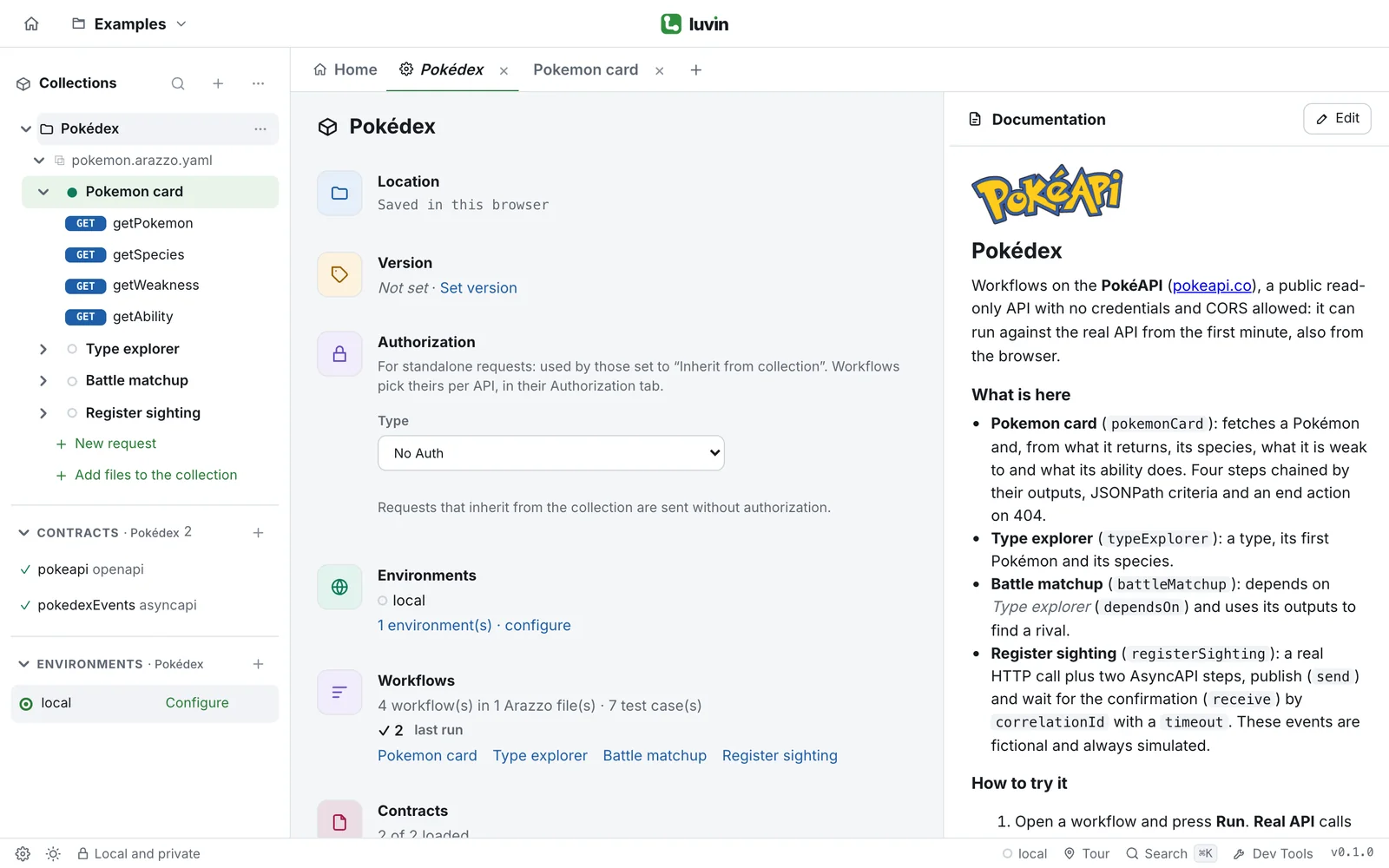
The collection overview is one page that summarizes a collection: where it is, its version, its authorization, its environments, workflows and contracts. Open it when you join a project, or when you hand a collection to someone else.
## Open it
Use any of these:
- On **Home**, click the name of a collection in the list.
- In the sidebar, click the name of a collection, or open its **⋯** menu and choose **Collection overview**.
- Click the tab with the collection name, if it is already open.
The overview opens in a tab named after the collection. The **Documentation** panel on the right is explained in [Write documentation](/workspaces/documentation/).
## The cards
| Card | What it shows and does |
|---|---|
| **Location** | The folder of the collection. **Show in Finder** (**Show in file explorer**) opens it in your file manager. **Open in Terminal** opens a terminal there. Both are desktop only. A collection saved in the browser shows **Saved in this browser**. |
| **Version** | The version your team gives the collection, or **Not set**. See [Set the version](/workspaces/collections/#set-the-version). |
| **Authorization** | The authorization of the requests set to **Inherit from collection**. See [Collection authorization](/workspaces/collection-authorization/). |
| **Environments** | The environments with their colors, and the link `2 environment(s) · configure`, which opens the active one. |
| **Workflows** | How many workflows, Arazzo files and test cases, for example `4 workflow(s) in 1 Arazzo file(s) · 12 test case(s)`. After you run cases it adds the last run: ✓ passed, ✕ failed, ! warning, ? inconclusive. Links open the first six workflows. |
| **Contracts** | How many contracts loaded, for example `3 of 3 loaded`, and a link to each one. |
| **Share** | A reminder that the collection is a folder you can share with git, and **Copy path**. |
The counts of the last run come from this session. They are not saved.
## The numbers on Home
**Home** has four counters: **Collections** of the workspace, and **Workflows**, **Contracts** and **Environments** of the collection that is open. The note under them names that collection.
<Aside type="tip">
A collection with no Arazzo shows a notice on **Home**: import them with **Import Arazzo or contracts**, or drop them on the collection. See [Collections](/workspaces/collections/#add-files-to-a-collection).
</Aside>
## Next
<CardGrid>
<LinkCard title="Collections" href="/workspaces/collections/" />
<LinkCard title="Write documentation" href="/workspaces/documentation/" />
<LinkCard title="What is on disk" href="/workspaces/files/" />
</CardGrid>
The collection overview is one page that summarizes a collection: where it is, its version, its authorization, its environments, workflows and contracts. Open it when you join a project, or when you hand a collection to someone else.

Open it
Section titled “Open it”Use any of these:
- On Home, click the name of a collection in the list.
- In the sidebar, click the name of a collection, or open its ⋯ menu and choose Collection overview.
- Click the tab with the collection name, if it is already open.
The overview opens in a tab named after the collection. The Documentation panel on the right is explained in Write documentation.
The cards
Section titled “The cards”| Card | What it shows and does |
|---|---|
| Location | The folder of the collection. Show in Finder (Show in file explorer) opens it in your file manager. Open in Terminal opens a terminal there. Both are desktop only. A collection saved in the browser shows Saved in this browser. |
| Version | The version your team gives the collection, or Not set. See Set the version. |
| Authorization | The authorization of the requests set to Inherit from collection. See Collection authorization. |
| Environments | The environments with their colors, and the link 2 environment(s) · configure, which opens the active one. |
| Workflows | How many workflows, Arazzo files and test cases, for example 4 workflow(s) in 1 Arazzo file(s) · 12 test case(s). After you run cases it adds the last run: ✓ passed, ✕ failed, ! warning, ? inconclusive. Links open the first six workflows. |
| Contracts | How many contracts loaded, for example 3 of 3 loaded, and a link to each one. |
| Share | A reminder that the collection is a folder you can share with git, and Copy path. |
The counts of the last run come from this session. They are not saved.
The numbers on Home
Section titled “The numbers on Home”Home has four counters: Collections of the workspace, and Workflows, Contracts and Environments of the collection that is open. The note under them names that collection.