
Test workflows
Reports
Export the results of a run as a self-contained HTML report or as JSON, and share them with someone who does not have Luvin.
A report is a copy of your results in a file. Use it to show that a workflow works, to send a failure to whoever builds the API, or to keep a record of a run. The person who receives it does not need Luvin.
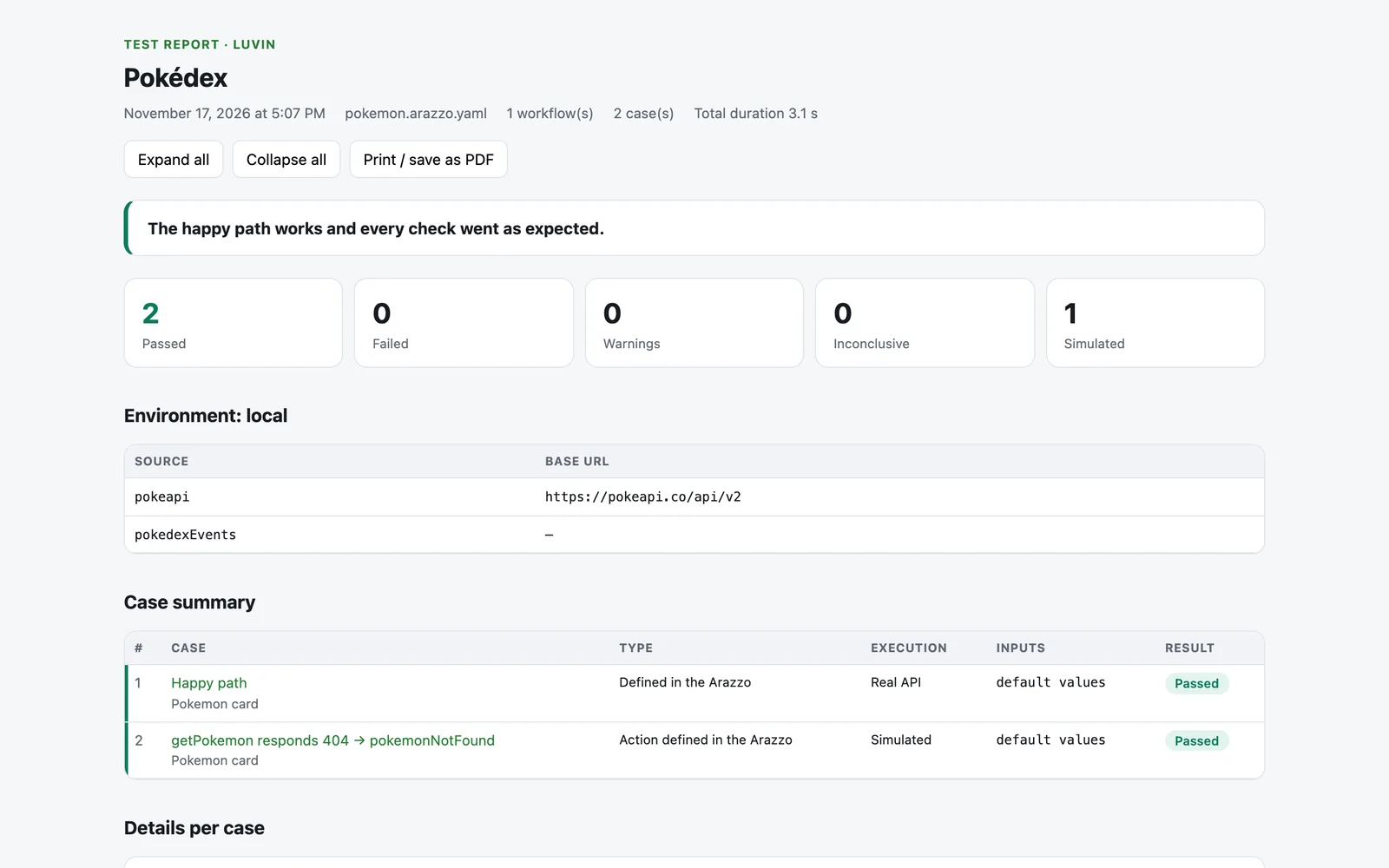
Example: report of a Pokemon card run
Section titled “Example: report of a Pokemon card run”The file report-<title>-<date>.html opens in any browser. It starts with the summary in plain words, for example The happy path works, with points to review., and the counters Passed, Failed, Warnings, Inconclusive and Simulated.
The file report-<title>-<date>.json has the same results for another tool. Its field names are in Spanish in both languages of the app.
{ "casos": [], "resultado": "", "pasos": []}Export the HTML report
Section titled “Export the HTML report”- Run the cases. See Run.
- In the header of the results, press Report.
- Your browser or the desktop app downloads a file named
report-<title>-<date>.html.
Report is hidden while a run is in progress and while the results are collapsed.
The report includes the latest results of every workflow you have run, not only the one on screen. It is written in the language the app is using.
What the report contains
Section titled “What the report contains”| Part | What it shows |
|---|---|
| Header | The title, the date, the Arazzo file, how many workflows and cases it covers, and the total duration. |
| Summary in plain words | The same sentence as in the results, for example The happy path works, with points to review. |
| Counters | Passed, Failed, Warnings, Inconclusive and Simulated. |
| Environment | The name of the environment and the base URL of each API. |
| Case summary | A table with every case: its type, whether it was simulated or ran against the real API, its inputs and its verdict. Click a case to jump to its detail. |
| Details per case | What was expected, the result, the Values sent, and every step with its request, response, criteria, contract check and outputs. |
Steps are closed at first, except the ones that failed. The buttons at the top are Expand all, Collapse all and Print / save as PDF.
One file, nothing else
Section titled “One file, nothing else”The report is a single HTML file with its styles inside. It needs no internet connection and no other file. Whoever receives it opens it in any browser.
To send a PDF instead, open the report and press Print / save as PDF. Every step is expanded before printing.
Secrets are masked
Section titled “Secrets are masked”The report is made to be shared:
- The secrets and credentials of the environment appear as
••••. - Values in fields and headers whose name looks sensitive (
token,password,secret,authorization,api key) are masked too. - The footer reminds the reader that credential values are hidden and that simulated cases use the contract examples, not the real API.
Export as JSON
Section titled “Export as JSON”- In the header of the results, press JSON.
- A file named
report-<title>-<date>.jsonis downloaded.
The JSON has the same results in a form another tool can read: when it was generated, the environment, and for each case its id, title, inputs, expected result, verdict, explanation, steps and outputs. Credentials are masked in the same way.
The field names are in Spanish in both languages of the app, for example casos, resultado and pasos. The verdict is one of passed, failed, warning or inconclusive.
Share with someone who does not have Luvin
Section titled “Share with someone who does not have Luvin”| They need to | Send |
|---|---|
| Read what happened | The HTML report, or its PDF |
| Reproduce one request | The text from Copy as cURL in the step. See Read a step result. |
| Process the results with a tool | The JSON file |
| Run the workflow themselves | The Arazzo file and its contracts. See Files of a workspace. |